A Background Music alternative for Mac
Short answer: Background Music is a free, open source per-app volume app that still works, but it runs through a virtual audio device and its README still calls it alpha. If you want a free replacement, try FineTune. If you want more, such as tab volume, quieter music on calls or recording, Earmix, which we make, costs $12.99 at its early-bird price.
What Background Music does
Background Music by Kyle Neideck is free under the GPL-2.0 licence and has around 19,400 stars on GitHub. It does three things:
- Per-app volume and mute, including turning a quiet app up.
- Auto-pause. When another app starts playing sound, it pauses your music player, and plays it again when the sound stops.
- System audio recording. It gives you a virtual input that carries everything the Mac plays, so apps like QuickTime or Audacity can record it.
Version 0.5.0 came out in June 2026, the first release since April 2024.
Why people look for an alternative
- It installs a virtual audio device. Background Music works by putting its own device between your apps and your speakers. Newer mixers use the audio taps macOS has offered since 14.2 Sonoma, so they don't need one.
- It's still marked alpha. The README says so, and releases have been far apart.
- The microphone indicator. A known quirk: macOS shows the mic indicator while audio plays, which is confusing when you aren't using the mic.
- It's basic. Its website doesn't list EQ, a different output per app, headphone correction or profiles.
If none of these bother you and it works on your Mac, there's no need to switch.
Alternatives at a glance
| Price | Per-app volume | Per-app EQ | Per-app output | Lower music on calls | Record | |
|---|---|---|---|---|---|---|
| Background Music | Free | Yes | Not listed | Not listed | Pauses music player | System audio, via its virtual input |
| Earmix | $12.99 early bird ($49) | Yes, to 400% | Yes | Yes | Yes, lowers other apps | Yes, any app or call |
| FineTune | Free | Yes, to 4x | Yes | Yes | Not listed | Not listed |
| SoundDial | $14.99 | Yes, to 200% | Yes | Yes | Yes | No |
| SoundSource | $49 | Yes, to 400% | Yes | Yes | Not listed | No |
From each app's website, checked November 2026. "Not listed" means the website doesn't mention it, not that the app can't do it. All names belong to their owners.
The free pick: FineTune
FineTune is free and open source too (GPL-3.0), but it's had more recent releases (1.9.0 in July 2026) and does much more: per-app boost to 4x, a 10-band EQ per app, a different output per app, AutoEq headphone correction and volume keys on HDMI outputs. It needs macOS 15 or later. See Earmix vs FineTune for the details.
The paid picks
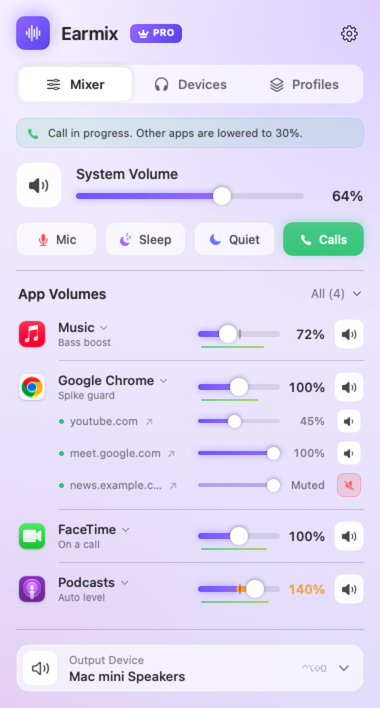
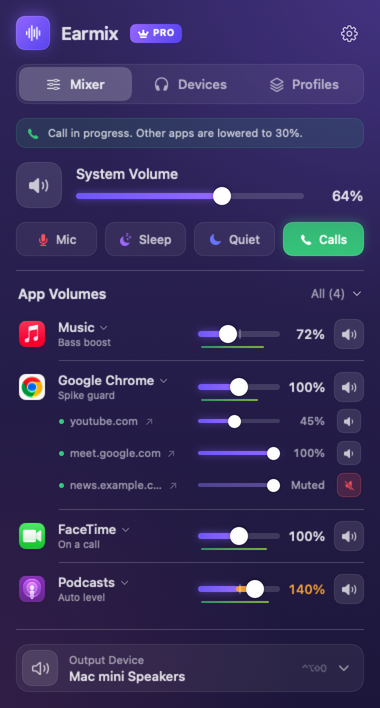
Earmix gives every app its own volume to 400%, EQ, output, balance and auto level. While any app uses the microphone, other apps drop to 30% and come back after the call. It records an app or a call to .m4a, and the free Earmix Tabs extension gives each browser tab its own slider. It runs on macOS 14.2 or later.
SoundSource ($49) is the most established option and covers all your Macs. SoundDial ($14.99, Mac App Store) also lowers music on calls. The best volume mixers for Mac guide compares them all.
Replacing Background Music's features
- Auto-pause. Earmix lowers other apps during calls rather than pausing your music. You choose how far they drop. See how to lower music during calls.
- Recording system audio. Earmix records an app from its options, using Record, and saves it to Music › Earmix Recordings as .m4a. If you need a loopback device for another app, see the BlackHole alternative guide, and how to record internal audio. If you record a call, check the law: many places need everyone's consent.
- Turning a quiet app up. Earmix's sliders go to 400% with a limiter, so a boost doesn't clip.
What it costs
Background Music and FineTune are free. Earmix is $12.99 once at the early-bird price (regular $49), for one Mac at a time, with a 14-day free trial and a 14-day refund. SoundDial is $14.99 and SoundSource $49.
Moving from Background Music to Earmix
- Quit Background Music from its menu bar icon.
- Open System Settings › Sound and check that Output is set to your real speakers or headphones, not the Background Music device.
- Open Earmix, allow System Audio Recording, and set your app volumes from the menu bar. Earmix remembers each one.
Questions
Is Background Music still maintained?
It had a release, 0.5.0, in June 2026, the first since April 2024. Its README still describes it as alpha.
Why does Background Music turn on the microphone indicator?
It's a known quirk of the way it works: macOS shows the mic indicator while audio plays through it.
Is there a free alternative to Background Music?
Yes. FineTune is free and open source, with per-app volume, EQ and output. It needs macOS 15 or later.
Does Background Music have an equalizer?
Its website doesn't list one. FineTune, SoundDial, SoundSource and Earmix all have a 10-band EQ for each app.
Try Earmix free for 14 days
Every feature, with no account and no card. Then $12.99 once at the early-bird price (regularly $49), with a 14-day refund. For macOS 14.2 or later, on Apple silicon and Intel.
Download Earmix