The best volume mixers for Mac in 2026
Short answer: For most people the choice is between SoundSource ($49, the most established, covers all your Macs), Earmix, which we make ($12.99 early bird, adds tab volume, call ducking and recording), SoundDial ($14.99, Mac App Store, has call ducking) and FineTune (free and open source). We make Earmix, so read this with that in mind; we've tried to say plainly where the others are better.
Why you need an app for this
macOS has no per-app volume mixer. Its one slider moves every app at once. A volume mixer adds a slider for each app, usually in the menu bar. For the background, see how to control the volume of each app on a Mac.
The apps at a glance
| Price | macOS | Per-app volume | Per-app EQ | Per-app output | Per-tab volume | Lower music on calls | Record | |
|---|---|---|---|---|---|---|---|---|
| Earmix | $12.99 early bird ($49) | 14.2+ | To 400% | Yes | Yes | Yes | Yes | Yes |
| SoundSource 6 | $49 | 15–27 | To 400% | Yes | Yes | Not listed | Not listed | No |
| SoundDial | $14.99 | 14.2+ | To 200% | Yes | Yes | No | Yes | No |
| FineTune | Free | 15+ | To 4x | Yes | Yes | Not listed | Not listed | Not listed |
| Background Music | Free | Not listed | Yes | Not listed | Not listed | Not listed | Pauses music | System audio |
| eqMac | Free; Pro from $3/mo | 10.13+ | Pro | Not listed | Not listed | Not listed | Not listed | Not listed |
| Boom 3D | Free download; $19.99+ packs | 11+ | Yes | Not listed | Not listed | Not listed | Not listed | Not listed |
From each app's website, checked November 2026. "Not listed" means the website doesn't mention it, not that the app can't do it. All names belong to their owners.
Earmix
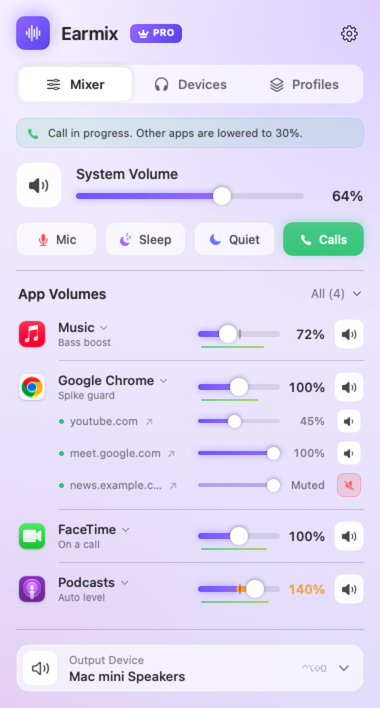
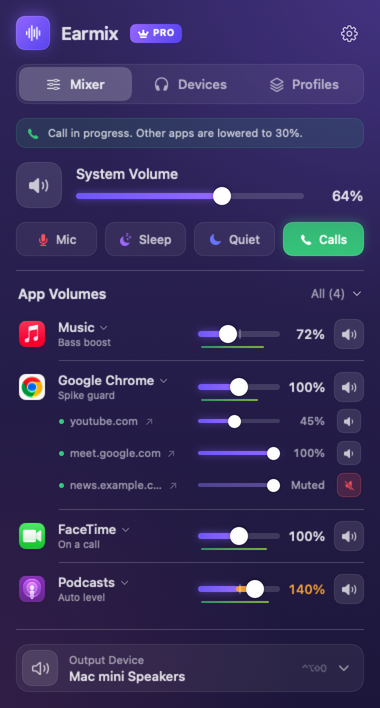
Every app gets volume from 0 to 400% with a limiter, mute, output, balance, mono, a 10-band EQ, auto level and spike guard. While any app uses the microphone, the others drop to 30% and come back after the call. It records any app or call to .m4a. The free Earmix Tabs extension gives each browser tab its own slider. It also has profiles that switch with your output, volume keys on HDMI screens, headphone EQ for 52 models, and Earmix for iPhone.
Limits: Earmix Tabs isn't in the Chrome, Edge or Firefox stores yet. Tab boost and tab recording work in Chrome-based browsers only. The iPhone app is a TestFlight beta. One licence is one Mac at a time. It's newer and from a smaller developer than SoundSource.
SoundSource 6
From Rogue Amoeba, a long-established Mac audio developer. Volume Overdrive boosts an app to 400%, each app has a 10-band EQ with preamp and its own output, and headphone EQ covers thousands of AutoEq models. It has Audio Units per app, Quick Configs and Super Volume Keys for HDMI screens. One $49 licence covers all of one person's Macs. It needs macOS 15 or later and doesn't record. See SoundSource vs Earmix.
SoundDial
$14.99 on the Mac App Store, macOS 14.2 or later. Sliders to 200% with meters, a 10-band EQ, per-app output, profiles, and call ducking that recognises a long list of call apps. 34 languages. It treats a browser as one app and doesn't record. See Earmix vs SoundDial.
FineTune
Free and open source (GPL-3.0), macOS 15 or later. Boost to 4x, a 10-band EQ and output per app, AutoEq with thousands of profiles, DDC volume for monitors and volume keys on HDMI outputs. If you want the basics and more without paying, start here. See Earmix vs FineTune.
Background Music
Free and open source, with per-app volume, mute, and auto-pause of your music player when something else plays. It uses a virtual audio device, its README still says alpha, and macOS shows the mic indicator while audio plays. See the Background Music alternative guide.
eqMac
A strong free system equalizer that runs back to macOS 10.13. Per-app volume needs eqMac Pro: $3 a month, $30 a year or $40 lifetime. Pro adds unlimited EQ bands, Audio Units and 4,600+ headphone presets.
Boom 3D
Boost, 3D surround, EQ presets, 5,000+ headphone models and internet radio, with per-app volume and an iPhone and iPad remote. A free download with $19.99 or $49.99 in-app packs, on up to four devices. Its listing says it may not work while AirPlay or FaceTime is on.
The small App Store mixers
If you only want sliders: Volumeboard is free (Pro adds 200% boost, per-app output and saved Mixes), VolMix and Gainiva are free, VolumeHub and Mimir are $4.99, and Sound Control 3 is a subscription with per-app output and Audio Units.
Pick by need
- Just sliders, free: FineTune on macOS 15 or later. Background Music is the other free option.
- Several Macs, one licence: SoundSource.
- The biggest boost: SoundSource or FineTune, both to 400% per app.
- Music that drops during calls: Earmix or SoundDial. See how to lower music during calls.
- Volume for one browser tab: Earmix with Earmix Tabs. See browser tab volume.
- Record an app or a call: Earmix, or SoundSource paired with Rogue Amoeba's Audio Hijack ($69) or Piezo ($29). Check consent laws before recording a call.
- A system EQ on an old Mac: eqMac.
- Surround effects and radio: Boom 3D.
- Buy through the Mac App Store: SoundDial.
- macOS 14 Sonoma: Earmix or SoundDial, both from 14.2.
Questions
What is the best volume mixer for Mac?
SoundSource is the most established, Earmix adds extras such as tab volume, call ducking and recording, SoundDial is a good App Store option, and FineTune is the best free one. Which is best depends on what you need from the list above.
Is there a free per-app volume control for Mac?
Yes. FineTune and Background Music are free and open source. FineTune has more features and more recent releases but needs macOS 15.
Does macOS have a built-in volume mixer?
No. macOS has one output volume for every app. Only alert sounds have a separate slider, in System Settings › Sound.
Which Mac volume mixer works on macOS Sonoma?
Earmix and SoundDial run on macOS 14.2 Sonoma or later. SoundSource 6 and FineTune need macOS 15.
Which volume mixer can lower music during calls?
Earmix and SoundDial both lower other apps automatically while you're on a call, by an amount you choose.
Try Earmix free for 14 days
Every feature, with no account and no card. Then $12.99 once at the early-bird price (regularly $49), with a 14-day refund. For macOS 14.2 or later, on Apple silicon and Intel.
Download Earmix