How to control the volume of each app on a Mac
Short answer: macOS can't set a different volume for each app. Its volume slider moves every sound at once. To turn one app down and leave the rest alone, use the app's own volume control if it has one, or install a per-app volume mixer such as Earmix, which we make, or a free one such as FineTune.
Why a Mac has only one volume slider
The volume slider in Control Center, the menu bar and System Settings › Sound sets the level of the output device: your speakers, headphones or AirPods. Every app plays through that one output, so every app moves together.
Windows has had a per-app volume mixer for years. macOS never added one. Since macOS 14.2 Sonoma, Apple has let apps "tap" another app's sound with the user's permission, and that's what modern per-app mixers use. Before that, they had to install a virtual audio driver.
What you can do without installing anything
- Use the app's own slider. Music, Spotify, VLC, QuickTime, YouTube and most video players have a volume control of their own. It's set inside the app, so it's independent of the others. Zoom, Teams and Slack have speaker volume in their audio settings.
- Mute a browser tab. Chrome, Edge, Firefox and Safari can mute a tab that's playing sound, but none of them gives a tab its own volume slider. See how to change the volume of one browser tab.
- Turn alerts down separately. System Settings › Sound has an Alert volume slider for beeps and notification sounds. It's the only per-sound control macOS has.
These work, but they're scattered. Each app hides its slider in a different place, and many apps, such as games, Slack huddles and most notification sounds, have no volume of their own.
How to get a volume slider for every app
A per-app volume mixer sits in the menu bar and lists every app that's making sound, each with its own slider. Here's how it works in Earmix:
- Download Earmix and open it. It asks for System Audio Recording permission. That's macOS's name for the permission to read an app's sound, which Earmix needs to change its volume. Nothing is recorded or saved.
- Click the Earmix icon in the menu bar. Every app playing sound has a row.
- Drag an app's slider. It goes from silent to 400%, with a limiter so a boost doesn't distort.
- Click an app's icon to mute it, or open its settings to send it to a different output or give it its own EQ.
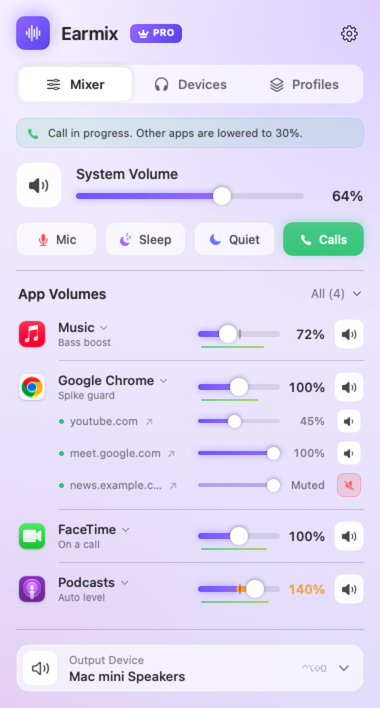
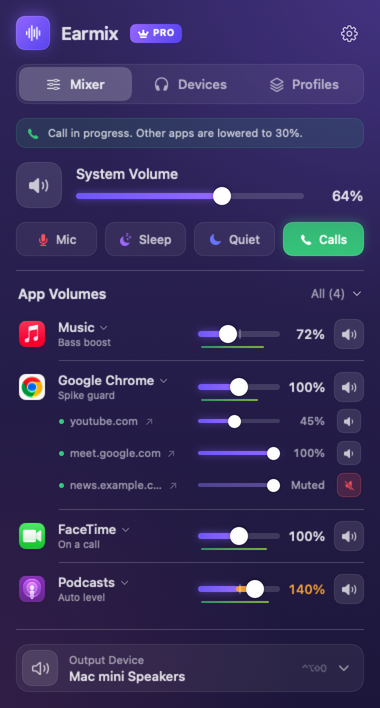
Earmix remembers each app's setting, so Spotify at 40% is still at 40% tomorrow. Apps you haven't touched keep playing exactly as macOS plays them.
Other apps that do this
| Price | Per-app volume | Per-app output | Per-tab volume | |
|---|---|---|---|---|
| Earmix | $12.99 early bird ($49) | Yes, to 400% | Yes | Yes, with the Earmix Tabs extension |
| SoundSource | $49 | Yes | Yes | Not listed |
| SoundDial | $14.99 | Yes | Yes | No |
| FineTune | Free, open source | Yes | Yes | Not listed |
From each app's website, checked November 2026. "Not listed" means the website doesn't mention it, not that the app can't do it. All names belong to their owners.
If you only want sliders and don't mind fewer features, FineTune is free and does the job. If you want more, our guide to the best volume mixers for Mac goes through each one.
Things people want next
- Turn the music down automatically on calls. Earmix lowers every other app while one uses the microphone, and brings them back when you hang up. See how to lower music during calls.
- Send an app to different speakers. Music to the HomePod, the call to your AirPods. See how to use a different output for each app.
- Make a quiet app louder. See how to make a Mac louder than its maximum volume.
Questions
Can you change the volume of individual apps on a Mac?
Not with macOS alone. Its volume slider moves every app at once. You can use each app's own volume control, or install a per-app mixer such as Earmix, SoundSource or FineTune.
Does a per-app volume mixer slow down my Mac?
Not noticeably. Earmix only processes the apps you adjust, which adds a few milliseconds. Apps you leave alone take the normal macOS path.
Why does Earmix ask for System Audio Recording permission?
That's the name macOS gives to the permission to read another app's sound. A mixer needs it to change an app's volume before it reaches your speakers. Earmix doesn't record or upload anything unless you press Record.
Is there a free per-app volume app for Mac?
Yes. FineTune and Background Music are free and open source. FineTune is the more current of the two.
Try Earmix free for 14 days
Every feature, with no account and no card. Then $12.99 once at the early-bird price (regularly $49), with a 14-day refund. For macOS 14.2 or later, on Apple silicon and Intel.
Download Earmix