How to get an equalizer for your whole Mac, or for each app
Short answer: macOS has no system-wide equalizer. The Music app has its own EQ under Window › Equalizer, but it only changes the Music app. For an EQ on everything, use eqMac (free for a 10-band EQ) or Boom 3D. For a separate EQ on each app, use Earmix, which we make, SoundSource or the free FineTune.
The only built-in EQ: the Music app
Open the Music app and choose Window › Equalizer. You get an equalizer for whatever Music plays. Nothing else on the Mac goes through it: Spotify, YouTube in a browser, games, podcasts in another app and calls all play without it.
There's no equalizer in System Settings › Sound. The Sound settings only have output volume, balance and mute, plus input and alert sounds.
System-wide EQ or per-app EQ?
Two kinds of apps fill the gap:
- A system-wide EQ applies one curve to everything the Mac plays. Good for fixing a pair of speakers or adding bass across the board.
- A per-app EQ gives each app its own curve. Useful when music wants more bass, but calls and podcasts sound better with less, or one game is harsh in the treble.
Some apps do both. If your goal is correcting a specific pair of headphones, see how to EQ your headphones on a Mac.
The options compared
| Price | Per-app EQ | Bands | Headphone presets | Audio Units | |
|---|---|---|---|---|---|
| Earmix | $12.99 early bird ($49) | Yes, plus a system EQ | 10 (32 Hz to 16 kHz), eight presets | 52 models (AutoEq) | Per app and on every app |
| eqMac | Free; Pro $3/month, $30/year or $40 lifetime | Not listed | 10 free; unlimited in Pro | 4,600+ (Pro) | Pro |
| Boom 3D | $19.99 or $49.99 packs | Not listed | 10 and 31-band presets | 5,000+ | Not listed |
| SoundSource | $49 | Yes, with preamp | 10 | Thousands (AutoEq) | Per app or system-wide |
| FineTune | Free, open source | Yes, 20 presets | 10 | Thousands (AutoEq) | Not listed |
From each app's website, checked November 2026. "Not listed" means the website doesn't mention it, not that the app can't do it. All names belong to their owners.
eqMac
eqMac's free Basic tier includes a 10-band system EQ in Basic and Advanced modes, a boost past 100%, and volume and balance for HDMI and DisplayPort screens. Pro adds per-app volume, an Expert EQ with unlimited bands, Audio Unit hosting, spatial audio and a spectrum analyser. It runs on macOS 10.13 or later, so it's the one to try on an older Mac. Its open-source repository only has an old version without the Pro features. See the eqMac comparison.
Boom 3D
Boom 3D is a free download on the Mac App Store with in-app purchases, and a 15-day trial. It has 10 and 31-band EQ presets, per-app volume, 3D surround and 20,000+ radio stations. One licence covers up to four devices. Its App Store listing says it may not work while AirPlay or FaceTime is on. See the Boom 3D comparison.
SoundSource
SoundSource 6 from Rogue Amoeba has a 10-band EQ with preamp on each app, AutoEq headphone EQ that can be set per app, and Audio Units per app or system-wide. It comes from a long-established developer, and one licence covers all your own Macs. It's $49.
FineTune
FineTune is free and open source. It has a 10-band EQ on each app with 20 presets, AutoEq headphone profiles and per-app output. If you want per-app EQ and don't want to pay, it's the obvious place to start.
Set up a per-app EQ in Earmix
- Click the Earmix icon in the menu bar.
- Open the options for the app you want to change, such as Spotify.
- Pick one of the eight presets, or drag the 10 bands from 32 Hz to 16 kHz.
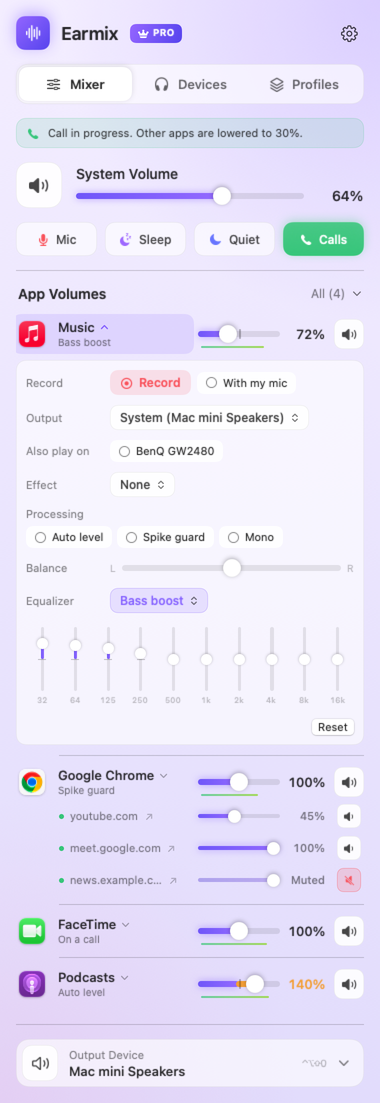
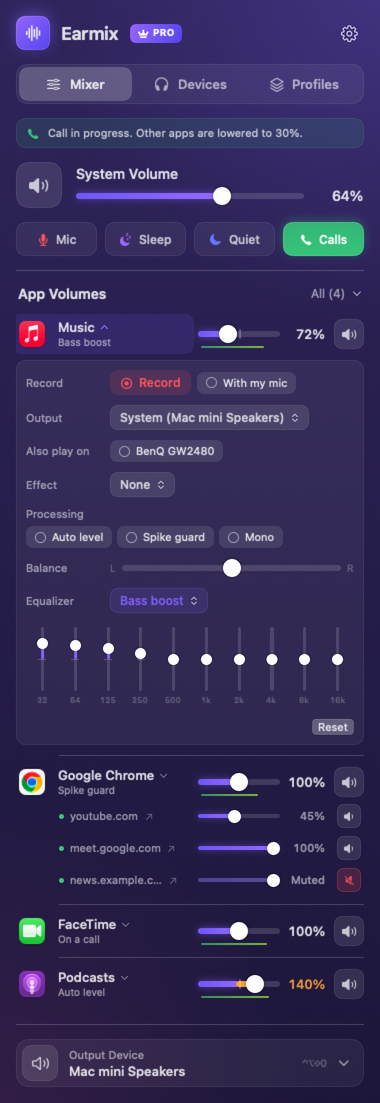
Each app keeps its EQ for next time. Apps you haven't adjusted aren't touched at all and take the normal macOS path.
For one curve on everything, Earmix also has a system EQ, and an Audio Unit effect slot that applies to every app. Each app can also load its own Audio Unit effect. Headphone correction lives separately in Devices › Headphone EQ, so you can use a headphone curve and a per-app EQ together.
Earmix also gives each app a volume slider up to 400%, auto level for apps that are too quiet or too loud, and its own output. If all you want is a system EQ, eqMac's free tier may be enough.
Questions
Does macOS have a system-wide equalizer?
No. The only built-in EQ is in the Music app, under Window › Equalizer, and it only affects the Music app. For an EQ on every app, install one such as eqMac, Boom 3D or Earmix.
Is there a free equalizer for Mac?
Yes. eqMac's free tier has a 10-band system EQ, and FineTune is free and open source with a 10-band EQ on each app.
Can I use a different EQ for each app on a Mac?
Not with macOS alone. Earmix, SoundSource and FineTune each give every app its own 10-band EQ.
Does the Music app's equalizer work for Spotify?
No. The Music app's EQ only changes what the Music app plays. Spotify, browsers and other apps need a separate equalizer app.
Try Earmix free for 14 days
Every feature, with no account and no card. Then $12.99 once at the early-bird price (regularly $49), with a 14-day refund. For macOS 14.2 or later, on Apple silicon and Intel.
Download Earmix