How to get a volume mixer on a Mac, like the one in Windows
Short answer: macOS doesn't have a volume mixer like the one in Windows. It has one slider that moves every app at once. To get a mixer with a slider per app, install one: Earmix, which we make, SoundSource and SoundDial are paid, and FineTune is free and open source.
What the Windows volume mixer does, and what a Mac has instead
On Windows you can open the volume mixer and see every app that's making sound, each with its own slider and mute. Turn the game down, keep the call loud.
A Mac has nothing like it. System Settings › Sound gives you one output device, one volume slider, mute and balance. The volume slider in Control Center and the menu bar is the same control. It sets the level of your speakers or headphones, so every app goes up and down together.
The only sound macOS lets you set on its own is alerts. In System Settings › Sound, under Sound Effects, you can set the alert volume and pick a separate output for alert sounds with "Play sound effects through". Everything else shares the one slider.
The built-in workarounds
- Each app's own volume. Music, Spotify, VLC and most video players have a slider inside the app. Zoom, Teams and Slack have speaker volume in their audio settings. It works, but every app hides it somewhere different.
- Mute a browser tab. Safari, Chrome and Firefox can mute a tab, but none has a volume slider per tab. See how to change the volume of one browser tab.
- Alert volume. The Sound Effects slider above, for beeps and notifications only.
If you only ever need to quiet one app now and then, those are enough. If you want the Windows experience, a list of apps with a slider each, you need a mixer app.
How to add a volume mixer to your Mac
A Mac volume mixer lives in the menu bar. Click it and you get a row for every app playing sound. Here's how it works in Earmix:
- Download Earmix and open it. It needs macOS 14.2 Sonoma or later, on Apple silicon or Intel.
- Allow System Audio Recording when macOS asks. That's what macOS calls the permission to read an app's sound, which a mixer needs to change it. Nothing is recorded unless you press Record.
- Click the Earmix icon in the menu bar. The Mixer tab lists each app that's making sound.
- Drag a slider to set that app from silent to 400%. Click the app's icon to mute it.
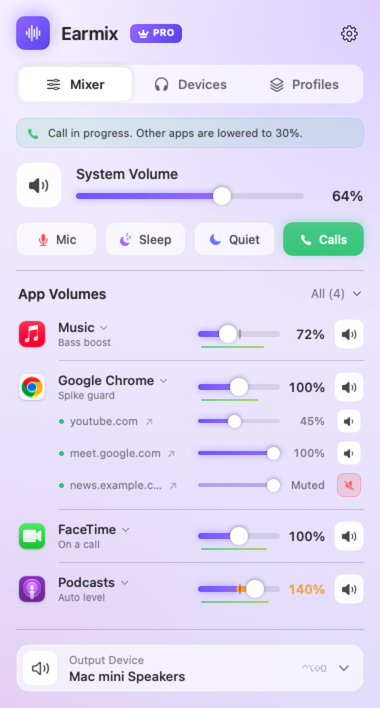
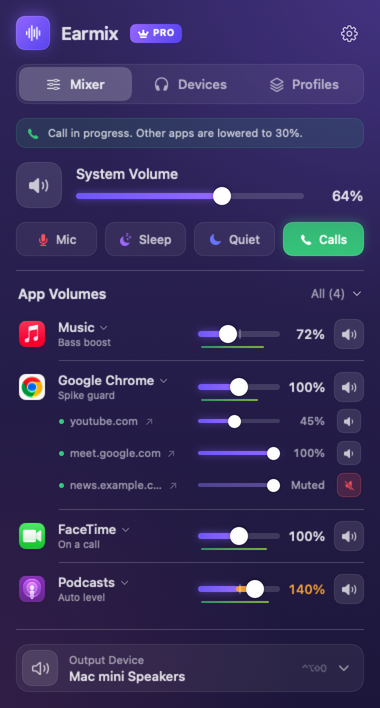
Each app keeps its setting for next time. Helper processes count as their app, so Chrome's many background processes show up as one Chrome row. Apps you never touch aren't processed at all and play exactly as before.
What a Mac mixer adds beyond Windows
The Windows mixer is volume and mute. Most Mac mixers go further:
- A different output per app. Music to the HomePod, the call to your AirPods. See how to send each app to its own output.
- Boost past 100%. Useful for a quiet video call or a podcast recorded too low. See how to make a Mac louder.
- EQ per app. Earmix has a 10-band EQ with eight presets for each app.
- Lower everything during calls. Earmix drops other apps to 30% (you choose how far) while an app uses the microphone, then brings them back. See how to lower music during calls.
- Keys for the app in front. In Earmix, hold ⌥ with the volume keys to change the app in front instead of the whole Mac.
The options side by side
| Price | Per-app volume | Boost | Per-app output | Per-tab volume | |
|---|---|---|---|---|---|
| Earmix | $12.99 early bird ($49), one Mac | Yes | To 400% | Yes | Yes, with Earmix Tabs |
| SoundSource | $49, all your Macs | Yes | To 400% | Yes | Not listed |
| SoundDial | $14.99, Mac App Store | Yes | To 200% | Yes | No |
| FineTune | Free, open source | Yes | 2x to 4x | Yes | Not listed |
| Background Music | Free, open source | Yes | Yes | Not listed | Not listed |
From each app's website, checked November 2026. "Not listed" means the website doesn't mention it, not that the app can't do it. All names belong to their owners.
Which one to pick depends on what you need. FineTune is free and covers sliders, boost, EQ and output, so it's enough for many people. SoundSource comes from Rogue Amoeba, a long-established developer, and one licence covers all your own Macs. Earmix is newer and smaller, with per-tab volume, call ducking and recording that the others don't list. Our guide to the best volume mixers for Mac goes through each one.
Questions
Does Mac have a volume mixer like Windows?
No. macOS has one volume slider for the output device, plus a separate alert volume. To set apps separately you need a mixer app such as Earmix, SoundSource, SoundDial or FineTune.
Is there a free volume mixer for Mac?
Yes. FineTune and Background Music are free and open source. FineTune is the more current of the two; Background Music's README still calls it alpha.
How do I open the volume mixer on a Mac?
There isn't one built in. Once you install a mixer app, it sits in the menu bar. In Earmix, click its menu bar icon or press ⌃⌥⇧V.
Can I change the volume of one app with the keyboard on a Mac?
Not with macOS alone. In Earmix, hold ⌥ while pressing the volume keys to change the app in front, or use ⌃⌥⇧↑ and ⌃⌥⇧↓.
Try Earmix free for 14 days
Every feature, with no account and no card. Then $12.99 once at the early-bird price (regularly $49), with a 14-day refund. For macOS 14.2 or later, on Apple silicon and Intel.
Download Earmix