Earmix › Guides › Fix a problem
Mac volume too low? How to make your Mac louder than max
Short answer: If your Mac is too quiet, first check the output device, the balance slider and the app's own volume in System Settings › Sound and the app itself. If it's still too quiet at full volume, macOS can't go higher, so use an app that boosts sound past 100%, such as Earmix, which we make, SoundSource, FineTune or eqMac.
Check these first
Most "too quiet" problems are a setting, not the speakers. Go through these before installing anything.
1. Is the right output selected?
Open System Settings › Sound and look at the Output tab. If the sound is going to a monitor, a TV, an old Bluetooth speaker or a virtual device you installed for recording, the Mac's slider may not do what you expect. Pick the device you're listening on.
If the output is an HDMI or DisplayPort monitor, the slider is greyed out and the level is set on the monitor. See why you can't change the volume on HDMI.
2. Is the balance centred?
In the same Output tab, check the Balance slider. If it's pushed to one side, one ear or speaker plays quieter, which makes everything sound low. Drag it back to the middle.
3. Is the app itself turned down?
Many apps have their own volume, separate from the Mac's. Check the slider in Music, Spotify, VLC or QuickTime, the player on the web page, and the speaker volume in Zoom, Teams or Slack's audio settings. An app at 30% stays quiet with the Mac at full.
4. Bluetooth headphones and speakers
- Make sure the headphones, not the Mac's speakers, are the selected output in System Settings › Sound or Control Center.
- If the headphones or speaker have their own volume buttons, turn those up too.
- Disconnect and reconnect them if the level seems stuck.
5. A volume limit you set and forgot
If you use a mixer app, check that it isn't capping the device. In Earmix, a device can have a volume cap, plugging in headphones switches on their own volume limit, and quiet hours can cap the volume at night. Check these in Earmix if the level seems held down.
Make one app louder than 100%
If an app is still quiet at full volume, often a video call or a podcast recorded too low, you need a boost. macOS has no setting for it.
In Earmix:
- Open Earmix from the menu bar (macOS 14.2 Sonoma or later).
- Find the quiet app in the Mixer tab.
- Drag its slider past 100%. It goes to 400%.
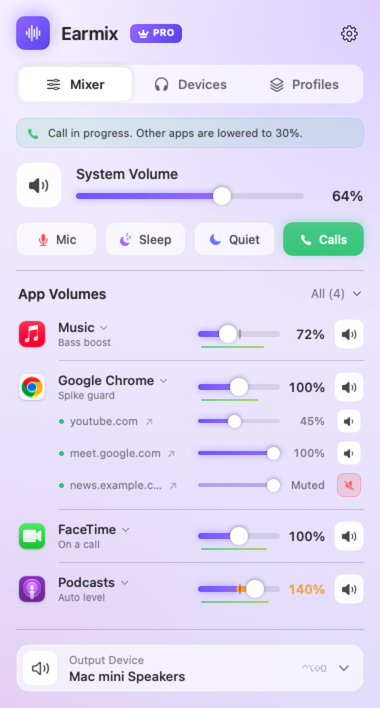
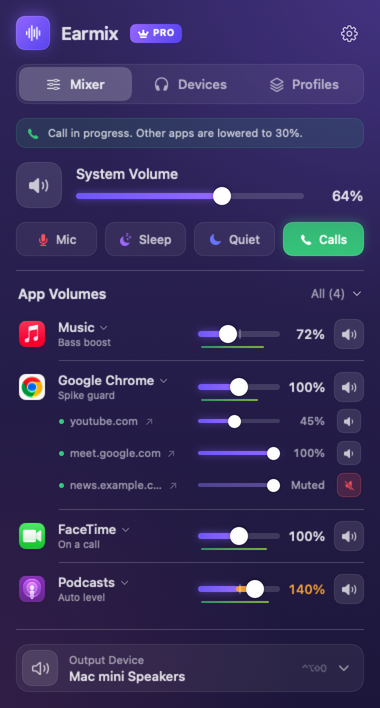
Earmix puts a limiter on anything above 100%, so a boosted app gets louder without clipping. Only the app you boost changes; everything else stays where it was.
For sound that's quiet some of the time and loud the rest, try Auto level in the app's settings instead. It keeps the app at an even loudness: quiet videos and podcasts come up, loud ads come down, by up to 12 dB. Spike guard stops anything jumping more than 12 dB above what was playing, which helps if you've boosted an app and a loud moment comes along.
Make one browser tab louder
A quiet video in one tab is a common case. With the Earmix Tabs extension, a tab in Chrome or another Chrome-based browser can go up to 400%, from the extension's popup. In Safari and Firefox, Earmix Tabs does volume and mute only, so boost the whole browser in Earmix instead. Earmix Tabs isn't in the Chrome, Edge or Firefox stores yet. See how to change the volume of one tab.
Other apps that boost volume
| Price | Boost | Per app | |
|---|---|---|---|
| Earmix | $12.99 early bird ($49), one Mac | To 400% with limiter | Yes |
| SoundSource | $49, all your Macs | Volume Overdrive to 400% with limiting, Magic Boost | Yes |
| FineTune | Free, open source | 2x, 3x or 4x | Yes |
| eqMac | Free basic; Pro $3/month | Boost beyond 100%, free tier | Pro |
| Boom 3D | Free download, in-app purchases from $19.99 | Yes | Yes |
From each app's website, checked November 2026. "Not listed" means the website doesn't mention it, not that the app can't do it. All names belong to their owners.
If you just need more volume and nothing else, FineTune and eqMac's free tier both boost for free. SoundSource also goes to 400%, and comes from Rogue Amoeba, a long-established developer. Our guide to the best volume mixers for Mac compares them in more detail.
Headphones that sound thin or quiet
Some headphones sound quieter than others because of how they're tuned. A headphone EQ can even them out. Earmix has measured curves for 52 popular models from AutoEq, from AirPods to HD 600, under Devices › Headphone EQ. See headphone EQ on a Mac.
Loud headphones for long stretches are hard on your ears. If you boost often, Earmix can track your listening time and weekly dose on headphones, based on WHO guidance. It's off until you turn it on, and stays on your Mac.
Questions
Why is my Mac volume so low even at max?
Usually the wrong output is selected, the balance is off-centre, or the app's own volume is down. Check System Settings › Sound and the app's slider. If it's still quiet, the recording itself may be quiet, and a boost app can help.
How do I make my Mac louder than the maximum volume?
macOS can't go past full volume. A boost app can: Earmix and SoundSource take any app to 400% with a limiter, and FineTune and eqMac boost for free.
Why are my AirPods or Bluetooth headphones so quiet on my Mac?
Check that they're the selected output in System Settings › Sound, that the balance is centred, and that any volume buttons on the headphones are turned up. A volume cap in a mixer app can also hold them down.
Does boosting volume damage Mac speakers?
A limiter keeps a boosted app from clipping, which is the harsh distortion you hear when sound goes over the top. Earmix uses one above 100%. Keep an ear on it anyway, and turn down if the speakers rattle.
Try Earmix free for 14 days
Every feature, with no account and no card. Then $12.99 once at the early-bird price (regularly $49), with a 14-day refund. For macOS 14.2 or later, on Apple silicon and Intel.
Download Earmix