How to send each app's sound to a different output on a Mac
Short answer: macOS can't send different apps to different outputs. Every app plays through the one device picked in System Settings › Sound, and only alert sounds can go elsewhere. To send each app to its own speakers or headphones, use a mixer with per-app output, such as Earmix, which we make, SoundSource, SoundDial or the free FineTune.
What macOS can do on its own
In System Settings › Sound, the Output tab has one device for the whole Mac. Pick your AirPods and everything goes to your AirPods.
There is one exception. Under Sound Effects, Play sound effects through sends alert sounds to a different output. So beeps and notification sounds can play on the Mac's speakers while music goes to your headphones. That's the only split macOS offers.
A Multi-Output Device in Audio MIDI Setup doesn't solve this either. It plays the same sound on several outputs at once, for every app together, not one app here and another there. See how to play audio through two outputs for when that's useful.
Why people want this
- Music on the HomePod or desk speakers, the Zoom call in your AirPods so the room doesn't hear it.
- A game on headphones, a stream on the TV.
- Notifications on the Mac's speakers, so they don't interrupt what's in your ears.
- A DJ or streaming setup that sends one app to an interface and the rest to speakers.
How to send an app to a different output with Earmix
- Open Earmix from the menu bar. It needs macOS 14.2 Sonoma or later.
- Find the app in the Mixer tab and open its settings.
- Under output, pick the device for that app: speakers, headphones, an interface or an AirPlay speaker.
- Repeat for any other app. Apps you don't change keep using the Mac's normal output.
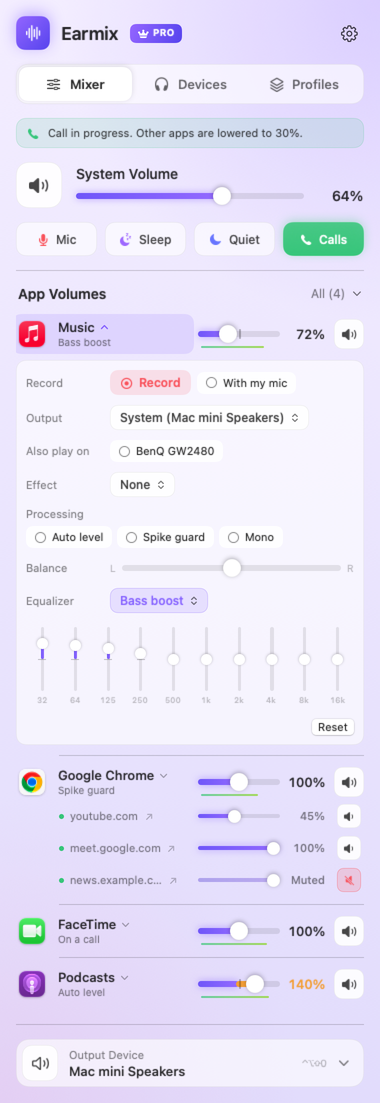
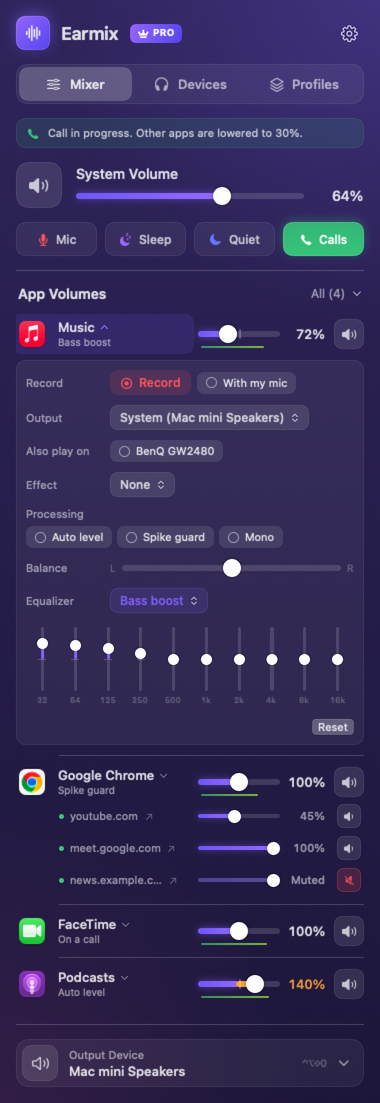
Earmix remembers the choice, so Music goes back to the HomePod next time you open it. A few details:
- AirPlay per app. You can send one app to an AirPlay speaker and keep the rest on the Mac.
- Two outputs for one app. An app can play on two outputs at once, kept in sync, such as music on both the desk speakers and a speaker in the next room.
- Switch the Mac's output fast. Earmix adds an Output menu to the menu bar, and ⌃⌥⇧O moves to the next output.
- Profiles by device. Save every app's settings as a profile and have it applied when a device becomes the output, for example a Commute profile when your AirPods connect.
Each app also keeps its own volume, so you can set a volume per app at the same time.
Other apps with per-app output
| Price | Per-app output | Several outputs | Per-app AirPlay | |
|---|---|---|---|---|
| Earmix | $12.99 early bird ($49), one Mac | Yes | Two per app | Yes |
| SoundSource | $49, all your Macs | Yes | Output Groups | Yes |
| SoundDial | $14.99, Mac App Store | Yes | Not listed | Not listed |
| FineTune | Free, open source | Yes | Multi-device output | Not listed |
| Volumeboard | Free; Pro one-time unlock | Pro | Not listed | Not listed |
From each app's website, checked November 2026. "Not listed" means the website doesn't mention it, not that the app can't do it. All names belong to their owners.
Who should pick which
- FineTune if you want it free. It's open source and has per-app output, multi-device output and device priority.
- SoundSource if you have several Macs or want an app with a long track record. Rogue Amoeba is a long-established developer, and one licence covers all your own Macs. It needs macOS 15 or later.
- Earmix if you also want call ducking, recording or per-tab volume in the same app. It's newer and from a smaller developer, and one licence is one Mac at a time.
Our guide to the best volume mixers for Mac compares them in more depth.
Questions
Can you set a different audio output for each app on a Mac?
Not with macOS alone. It has one output for every app, and only alert sounds can be sent elsewhere. A mixer such as Earmix, SoundSource, SoundDial or FineTune adds an output choice per app.
How do I play music on speakers and a call in headphones on a Mac?
Set the Mac's output to your headphones, then use a per-app mixer to send the music app to the speakers. In Earmix, open the music app's settings and pick the speakers as its output.
Can I send one app to an AirPlay speaker?
Yes, with a mixer that supports AirPlay per app. Earmix and SoundSource both do. macOS alone sends the whole Mac to AirPlay.
Does a Multi-Output Device let each app use a different output?
No. A Multi-Output Device plays all sound on several outputs at once. It isn't per app.
Try Earmix free for 14 days
Every feature, with no account and no card. Then $12.99 once at the early-bird price (regularly $49), with a 14-day refund. For macOS 14.2 or later, on Apple silicon and Intel.
Download Earmix