How to EQ your headphones on a Mac
Short answer: macOS has no equalizer that applies to every app, so it can't correct your headphones on its own. A headphone EQ app does that, usually with measured curves from the open-source AutoEq project. Earmix, which we make, has curves for 52 popular models, from AirPods to the HD 600. SoundSource, FineTune, eqMac and Boom 3D cover more models.
What headphone EQ does
Every pair of headphones changes the sound a little. Some boost the bass, some are sharp in the treble. Headphone correction applies the opposite curve, so the sound gets closer to a neutral target.
The curves come from measurements. AutoEq is an open-source project that publishes measured correction curves for many headphones, and Earmix, SoundSource and FineTune all use it. You pick your model and the app applies the curve.
This is different from a normal EQ, where you move the sliders to taste. You can still do that on top. See our guide to equalizers for Mac.
What macOS has built in
Not much. macOS has no system-wide equalizer. The Music app has its own EQ under Window › Equalizer, but it only changes the Music app. Spotify, YouTube in the browser, games and calls all play without it.
So if you want your headphones corrected for everything, you need an app.
Set up headphone EQ in Earmix
- Plug in or connect your headphones and make them the output.
- Click the Earmix icon in the menu bar and open the Devices tab.
- Choose Headphone EQ and pick your model from the list.
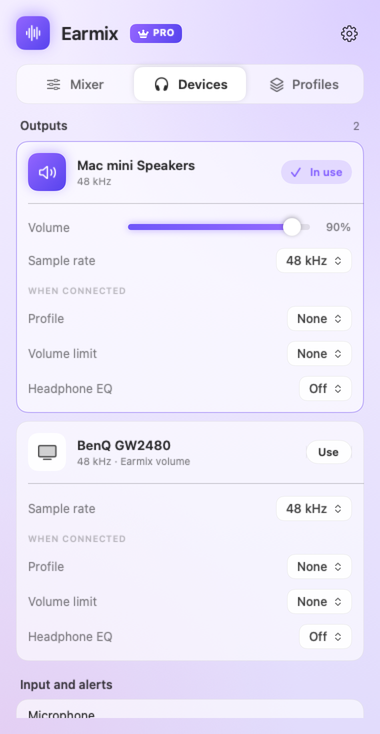
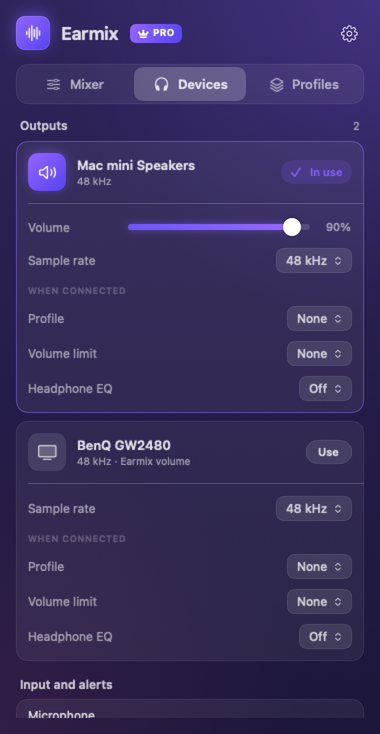
The correction applies to everything you play on that device, so Spotify, the browser and calls all get it. It stays tied to the headphones: switch to the speakers and they play without it.
Earmix's list has measured curves for 52 popular models from AutoEq, AirPods to the Sennheiser HD 600. That's a short list next to the apps below. If your model isn't on it, one of those is the better choice.
More for headphone listening. Plugging in headphones can switch on their own mix and a volume limit. Earmix can also track listening time and a weekly dose on headphones, based on WHO guidance. It's off until you turn it on, and the data stays on the Mac.
AirPods EQ on a Mac
AirPods are in Earmix's list. Connect them, make them the output, then pick your model in Devices › Headphone EQ. You can also give AirPods their own profile that applies when they become the output, such as a "Commute" profile, and cap the volume on them.
On top of the correction, each app has its own 10-band EQ in Earmix if you want, say, more bass in music but not in calls.
Other headphone EQ apps
| Price | Headphone models | Source of curves | Per-app EQ | |
|---|---|---|---|---|
| Earmix | $12.99 early bird ($49) | 52 popular models | AutoEq | Yes, 10-band |
| SoundSource | $49 | Thousands, plus custom profiles | AutoEq | Yes, 10-band |
| FineTune | Free, open source | Thousands, imports ParametricEQ.txt and EqualizerAPO | AutoEq | Yes, 10-band |
| eqMac | Pro $3/month, $30/year or $40 lifetime | 4,600+ reference presets (Pro) | Not listed | Not listed |
| Boom 3D | $19.99 or $49.99 packs | 5,000+ | Not listed | Not listed |
From each app's website, checked November 2026. "Not listed" means the website doesn't mention it, not that the app can't do it. All names belong to their owners.
- FineTune is free and open source, with thousands of AutoEq profiles and imports from other EQ tools. If headphone correction is all you need, start there.
- SoundSource comes from Rogue Amoeba, a long-established developer, and since version 6 its headphone EQ can be set per app. One licence covers all your own Macs. See our SoundSource alternative guide.
- eqMac has reference presets for 4,600+ headphones in its Pro tier. See the eqMac comparison.
- Boom 3D lists 5,000+ headphone models, along with 3D surround.
Why pick Earmix for headphone EQ
Pick Earmix if your headphones are on its list and you also want the mixer: a volume slider for each app, call ducking, a different output per app and recording. If you only want headphone correction for a less common model, FineTune or SoundSource will serve you better.
Questions
Does macOS have a headphone EQ?
No. macOS has no system-wide EQ. The Music app's equalizer only affects the Music app. For every app, you need a headphone EQ app such as Earmix, SoundSource or FineTune.
What is AutoEq?
AutoEq is an open-source project that publishes measured correction curves for headphones. Apps like Earmix, SoundSource and FineTune use its curves to make headphones sound closer to neutral.
How do I EQ AirPods on a Mac?
Use a headphone EQ app. In Earmix, connect the AirPods, open Devices › Headphone EQ and pick your AirPods model. The correction applies to everything played on them.
Is there a free headphone EQ for Mac?
Yes. FineTune is free and open source and includes thousands of AutoEq profiles.
Try Earmix free for 14 days
Every feature, with no account and no card. Then $12.99 once at the early-bird price (regularly $49), with a 14-day refund. For macOS 14.2 or later, on Apple silicon and Intel.
Download Earmix