How to control your Mac's volume from your iPhone
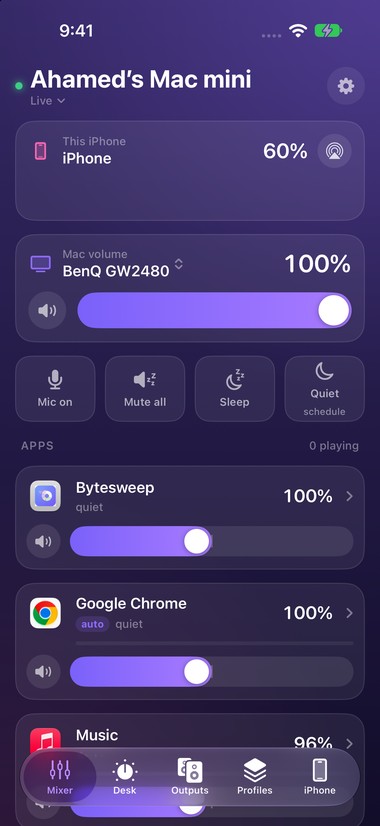
Short answer: macOS doesn't come with a way to control the Mac's volume from an iPhone. You need a remote app. Earmix for iPhone, which comes free with Earmix, which we make, shows every app's slider on your phone and lets the iPhone's volume buttons turn the Mac up and down. It's in beta on TestFlight for now.
Why use your phone as a remote
- You're across the room, or on the sofa with the Mac plugged into a TV.
- You're on a call and want to mute your mic without finding the window.
- The music is too loud and the Mac is on a desk across the room.
A phone remote puts the controls in your hand.
What Earmix for iPhone does
- Every slider from the menu bar. Each app's volume and mute, the same as in Earmix's mixer on the Mac.
- Volume buttons. The iPhone's own volume buttons turn the Mac up and down.
- Face down to pause. Turn the phone face down and the Mac pauses. An incoming iPhone call pauses it too.
- Mute the Mac's mic. From the Lock Screen, Control Center or the Action button.
- The phone's own audio. The iPhone's volume and output sit on the same screen.
How to set it up
The iPhone app is a beta, shared through Apple's TestFlight. It's free with Earmix.
- Email support@earmix.app to join the TestFlight beta, then install Earmix for iPhone from the TestFlight invite.
- On the Mac, open Earmix's settings and turn on Phone remote.
- Earmix shows a QR code. Scan it with the iPhone app.
- Keep both on the same Wi-Fi. The phone now shows every app that's playing on the Mac.
The QR code carries a private code that pairs your phone with your Mac. You can reset the code at any time.
Privacy and network
The iPhone talks to the Mac over your own Wi-Fi only. There's no cloud service in between and no account. Earmix processes audio on the Mac and never uploads it, and it doesn't send analytics or crash reports.
That also means the remote won't work from outside your home or office network. If the phone and the Mac are on different networks, they can't see each other.
Things to know
- It's a beta. Expect rough edges, and tell us at support@earmix.app when something breaks.
- Earmix needs to run on the Mac. The phone is a remote for Earmix, so the Mac app does the work. It needs macOS 14.2 Sonoma or later.
- Boom 3D has a remote too. Its iPhone and iPad app, Boom Remote, works with Boom 3D on the Mac. If you already use Boom 3D, try that first.
Other ways to control the Mac without touching it
If you just want to change volume from the keyboard or without opening a window, Earmix also has shortcuts, Shortcuts actions, Siri, widgets, Raycast and Stream Deck support, and earmix:// links such as earmix://volume?app=front&value=40. To mute your mic from anywhere on the Mac, see the mute microphone shortcut. For the app itself, start with how to control the volume of each app, or how to lower music during calls if calls are why you reach for the remote.
Questions
Can I control my Mac's volume from my iPhone?
Not with what Apple includes. A remote app does it: Earmix for iPhone, free with Earmix and in beta on TestFlight, lets the iPhone's volume buttons and sliders control the Mac.
Can I use my iPhone volume buttons to change the Mac's volume?
Yes, with Earmix for iPhone. While it's connected, the iPhone's volume buttons turn the Mac up and down.
Does the iPhone remote work over the internet?
No. Earmix for iPhone connects over your own Wi-Fi only, paired with a QR code. The phone and Mac need to be on the same network.
Can I mute my Mac's microphone from my iPhone?
Yes. Earmix for iPhone can mute the Mac's mic from the Lock Screen, Control Center or the Action button.
Try Earmix free for 14 days
Every feature, with no account and no card. Then $12.99 once at the early-bird price (regularly $49), with a 14-day refund. For macOS 14.2 or later, on Apple silicon and Intel.
Download Earmix