How to change the volume of one tab in Chrome, Safari or Firefox
Short answer: No browser has a volume slider for each tab. Safari, Chrome and Firefox can only mute a tab. To turn one tab down and leave the others alone, use the video player's own volume, or a per-tab volume control such as Earmix Tabs, the free extension that comes with Earmix, which we make.
Mute a tab in Safari
Safari shows an Audio button when a tab is playing sound.
- Click the Audio button to mute that tab. Click it again to unmute.
- To silence everything at once, use Mute All Tabs.
That's on or off. There's no way to set a tab to half volume.
Mute a tab or site in Chrome
- Right-click the tab that's playing.
- Choose Mute site.
Chrome mutes the whole site, not just that tab, and remembers it. So muting one YouTube tab mutes YouTube in every tab, now and next time, until you unmute it the same way.
Mute a tab in Firefox
Click the speaker icon on the tab itself. Click it again to bring the sound back. Again, it's mute only.
Use the player's own volume
Most video sites, such as YouTube, have a volume slider in the player. It only changes that page, so it works as a rough per-tab control. Sites without a player control, and ads or autoplay clips, can't be set this way.
Give every tab its own volume slider
Earmix Tabs is a free browser extension that works with Earmix. It gives each tab its own slider and mute, and those tabs show up in Earmix's mixer under their browser, next to your other apps.
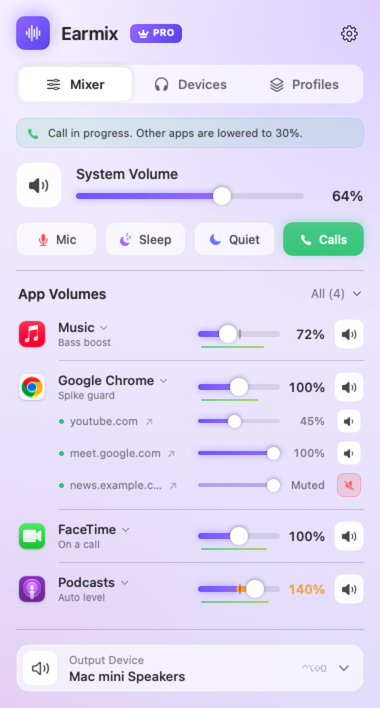
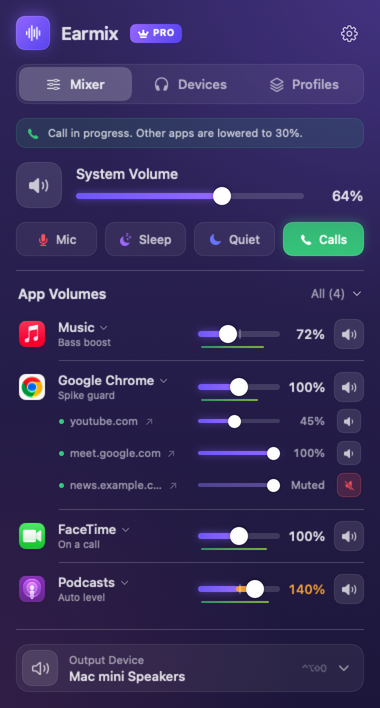
It works in Chrome, Edge, Brave, Arc, Vivaldi, Opera, Firefox and Safari. There are a few things to know before you count on it:
- It's not in the Chrome, Edge or Firefox stores yet. Those store listings are coming soon.
- Safari's extension comes inside Earmix. Turn it on in Safari › Settings › Extensions.
- Boost is Chrome-based only. In Chrome and other Chrome-based browsers you can push a tab past 100%, up to 400%, from the extension's popup. In Safari and Firefox you get volume and mute only.
- Recording one tab is Chrome-based only too. In Safari or Firefox, record the whole browser from Earmix instead. See how to record internal audio on a Mac.
Tab volume works inside the page, so the browser doesn't show a "sharing" indicator while you use it.
If you don't need tabs separately, Earmix also treats the whole browser as one app with its own slider. All of Chrome's or Safari's helper processes count as that browser, so one row covers every tab. See how to control the volume per app on a Mac.
Which to use
| Mute a tab | Volume per tab | Boost a tab | |
|---|---|---|---|
| Safari | Yes, Audio button | No | No |
| Chrome | Yes, mutes the whole site | No | No |
| Firefox | Yes, speaker icon | No | No |
| Earmix Tabs | Yes | Yes | Chrome-based browsers, to 400% |
If muting is all you need, the browser's own button is enough. If you want a quiet background tab and a loud call in another, you need a slider per tab. Other Mac mixers we know of treat the browser as one app; SoundDial says so on its website. Our comparison of Mac volume mixers covers the rest.
Questions
Can you change the volume of one tab in Chrome?
Not with Chrome alone. It can mute a site with right-click › Mute site, but it has no volume slider per tab. An extension such as Earmix Tabs adds one, and can boost a tab to 400%.
How do I turn down one tab in Safari?
Safari can only mute a tab, using its Audio button. For a slider per tab, turn on the Earmix Tabs extension that comes inside Earmix, in Safari › Settings › Extensions.
Why does muting one tab in Chrome mute the others?
Chrome's Mute site mutes the whole site, not the tab. Every tab from that site is muted, and Chrome remembers it until you unmute the site.
Is Earmix Tabs in the Chrome Web Store?
Not yet. The Chrome, Edge and Firefox store listings are coming soon. The Safari extension already comes inside Earmix.
Try Earmix free for 14 days
Every feature, with no account and no card. Then $12.99 once at the early-bird price (regularly $49), with a 14-day refund. For macOS 14.2 or later, on Apple silicon and Intel.
Download Earmix