Earmix › Guides › Fix a problem
How to lower music automatically during calls on a Mac
Short answer: macOS has no setting that lowers other apps during a call. You can turn Spotify down with its own slider before the call, or use an app that ducks automatically: Earmix, which we make, drops every other app while one uses the microphone, and SoundDial does this too.
Why music stays loud on Zoom
The Mac has one volume for the output device, and every app plays at that level. When you join a Zoom, Teams or FaceTime call, macOS doesn't change anything else. Spotify keeps playing at the same volume, a YouTube video in another tab keeps going, and notification sounds land on top of the other person's voice.
Turning the Mac's volume down doesn't help either, because the call goes down with the music.
Quick fixes without extra software
These work if you remember to do them before each call.
- Turn the music app down. Spotify, Music and most players have their own volume slider. Drag it down before the call, and back up after. The call app stays at the Mac's volume.
- Turn the call up instead. Zoom, Teams and Slack have speaker volume in their audio settings. Raising it there and lowering the Mac's volume gives a similar result.
- Pause the music. The simplest fix, if you don't need background music.
- Send the call somewhere else. macOS can only send alert sounds to a separate output (System Settings › Sound › Sound Effects). It can't put the call on your AirPods and the music on your speakers.
The trouble is that none of this is automatic. You have to do it at the start of every call and undo it at the end.
Lower music automatically with Earmix
Earmix watches for any app using the microphone. When Zoom, Meet, FaceTime, Teams or another call app turns the mic on, every other app drops to 30%. When the call ends and the mic turns off, they come back to where they were.
- Install Earmix and give it System Audio Recording permission. That's macOS's name for reading an app's sound. Nothing is recorded unless you press Record.
- Check how far you want other apps to drop. The default is 30%, and you can change it.
- Join a call. Spotify and everything else get quieter on their own.
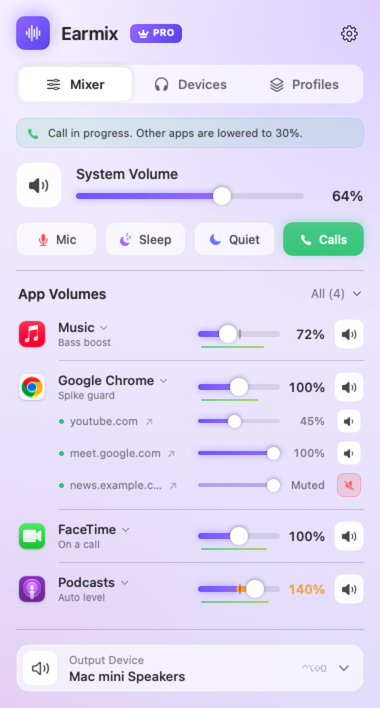
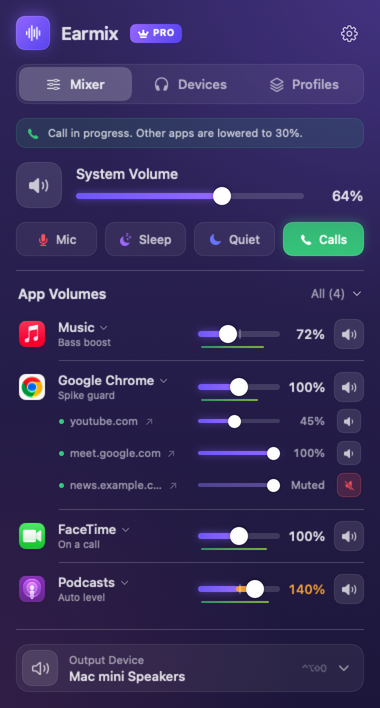
Because it works off the microphone, it covers calls in the browser too, such as Google Meet in Chrome, not only apps on a list.
Set a permanent level for Spotify
If Spotify is always too loud next to everything else, set it once. In Earmix, drag Spotify's slider to the level you want, say 40%. Earmix remembers each app's setting, so it's still at 40% tomorrow. During a call it drops, then returns to 40% when you hang up.
The same works the other way. If a call app is too quiet, push its slider above 100%. It goes up to 400%, with a limiter so the boost doesn't distort. See how to make a Mac louder than its maximum volume.
Put the call and the music on different outputs
Some people want music on the speakers and the call in their AirPods. Earmix can send each app to its own output, so Zoom goes to the AirPods and Spotify to the speakers or a HomePod. See how to use a different output for each app.
Other apps that duck during calls
| Price | Ducks during calls | Adjustable | Per-app volume | |
|---|---|---|---|---|
| Earmix | $12.99 early bird ($49) | Yes, any app using the mic | Yes | Yes, to 400% |
| SoundDial | $14.99 | Yes, many call apps and browser calls | Yes | Yes, to 200% |
| SoundSource | $49 | Not listed | Not listed | Yes |
| FineTune | Free, open source | Not listed | Not listed | Yes |
| Background Music | Free, open source | Pauses your music player when other audio plays | Not listed | Yes |
From each app's website, checked November 2026. "Not listed" means the website doesn't mention it, not that the app can't do it. All names belong to their owners.
SoundDial is a good choice if you want to buy through the Mac App Store. Background Music doesn't lower the music; it pauses your music player when another app plays sound, which some people prefer. For a wider look, see the best volume mixers for Mac.
While you're on the call
- Mute fast. ⌃⌥⇧A mutes your mic in every app at once. See how to mute your mic with a shortcut.
- Record it. Earmix can record the call with your voice mixed in. See how to record a Zoom call.
Questions
How do I lower music volume during calls on a Mac?
macOS can't do it automatically. Lower the music app's own slider before the call, or use Earmix or SoundDial, which drop other apps while a call is on and bring them back after.
Does macOS have auto ducking?
No. There's no setting in macOS that lowers other apps during a call. You need a third-party app for that.
Why is Spotify so loud on Zoom calls?
Both play at the Mac's single volume level, and Zoom doesn't lower other apps. Turn Spotify down with its own slider, or use an app that ducks it while Zoom uses the mic.
Does Earmix ducking work with Google Meet in the browser?
Yes. Earmix ducks whenever an app uses the microphone, and that includes a browser running a Meet call.
Try Earmix free for 14 days
Every feature, with no account and no card. Then $12.99 once at the early-bird price (regularly $49), with a 14-day refund. For macOS 14.2 or later, on Apple silicon and Intel.
Download Earmix