How to record a Zoom, Teams or FaceTime call on a Mac
Short answer: Zoom can record a meeting on free and paid plans if the host allows it. Teams and Google Meet only record on certain paid plans, and FaceTime has no record button at all. To record any call on a Mac, with both sides, use a recorder such as Earmix, which we make, Piezo or Audio Hijack.
First, check the law. Many places need everyone on a call to agree before you record it. Tell people you're recording, and check the rules where you and they are.
Record with the call app itself
The built-in options cost nothing extra if your plan includes them.
Zoom
Zoom's local recording works on free and paid plans, in the desktop client. Click Record in the meeting controls. If you're not the host, the host has to give you permission first.
Microsoft Teams
Recording in Teams needs an eligible business or enterprise licence. Teams Free can't record. If your work account has one, you can record from the meeting.
Google Meet
Meet records only on certain paid Google Workspace plans, or with a Google One plan of 2 TB or more. Free personal Google accounts can't record a meeting.
FaceTime
FaceTime has no record button. The Screenshot app (⇧⌘5) can include system audio on macOS 27, but on macOS 26 and earlier it only records your microphone, so you'd lose the other side. See how to record internal audio on a Mac for the details.
Phone calls on the Mac
The Phone app on a Mac can record phone calls: open More and choose Call Recording. Both sides hear a notice that the call is being recorded, and the recording is saved in Notes. It depends on your region and language, so you may not see it.
Record any call with Earmix
If your plan doesn't include recording, or you're on FaceTime, Slack, Discord or a call in the browser, Earmix can record the call app directly.
- Start or join the call.
- Click the Earmix icon in the menu bar.
- Open the options for the call app, such as Zoom, Teams or FaceTime.
- Press Record. Press it again when you're done.
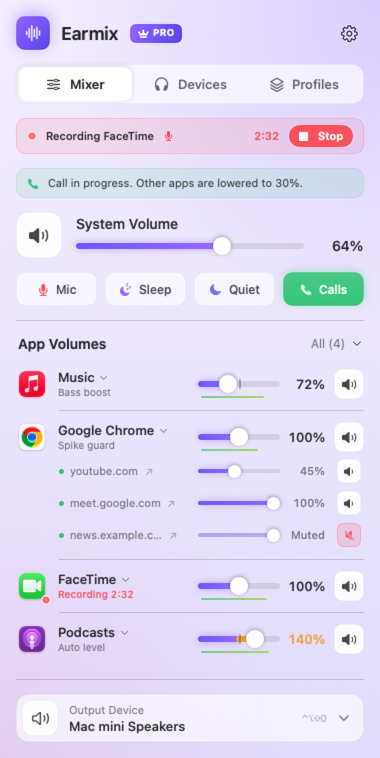
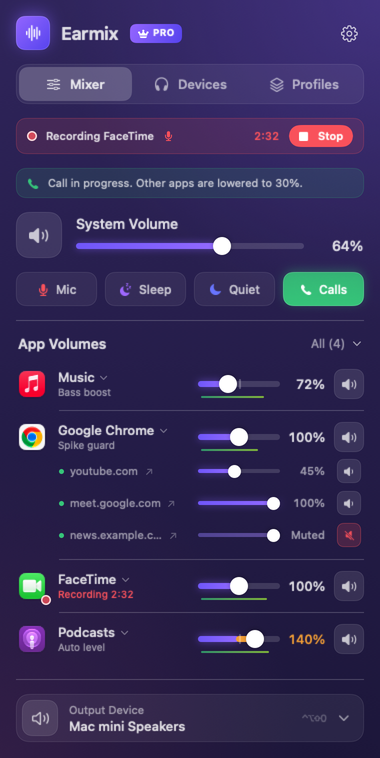
Because the call app is using the microphone, Earmix mixes your voice in with the other side. If you only want the other people, turn off With my mic. The call carries on as normal while it records.
The file goes to Music › Earmix Recordings as an .m4a (AAC). Only the call app is in it, so a notification sound or music from another app doesn't end up in the recording.
Calls in a browser. For Google Meet or another call in a browser tab, you can record the whole browser from Earmix. In Chrome-based browsers, the free Earmix Tabs extension can also record a single tab from its popup, saved to Downloads › Earmix Recordings. The extension isn't in the Chrome or Firefox stores yet.
Bluetooth headsets. On a Bluetooth headset, the mic during a call is 16 kHz call quality, so your side will sound like a phone call. A wired or built-in mic gives you a clearer recording.
Other ways to record a call
- Piezo ($29 one-time, Rogue Amoeba) records Zoom and FaceTime calls in one click, with a mic. Its trial adds noise to recordings longer than 10 minutes.
- Audio Hijack 4 ($69 one-time, Rogue Amoeba) records VoIP calls, apps and mics, and has local transcription. A good pick if you record a lot and want more control.
- BlackHole (free) is a virtual audio driver you pair with a recorder. It needs a Multi-Output Device and a separate way to add your mic, so it's more work for calls.
| Price | Records any call app | Your voice included | Plan limits | |
|---|---|---|---|---|
| Zoom recording | Included | Zoom only | Yes | Host permission |
| Teams recording | Included in eligible plans | Teams only | Yes | Not in Teams Free |
| Meet recording | Included in eligible plans | Meet only | Yes | Paid plans only |
| Piezo | $29 | Yes | Yes | None |
| Audio Hijack 4 | $69 | Yes | Yes | None |
| Earmix | $12.99 early bird ($49) | Yes | Yes, or leave it out | None |
From each app's website, checked November 2026. "Not listed" means the website doesn't mention it, not that the app can't do it. All names belong to their owners.
Tips for a better call recording
- Turn other apps down. Earmix lowers every other app while one uses the microphone, so music doesn't talk over the call. See how to lower music during calls.
- Mute yourself quickly. ⌃⌥⇧A mutes your mic in every app at once. See how to mute your mic with a shortcut.
- Do a short test. Record ten seconds before an important call and play it back.
Questions
How do I record a Zoom call on a Mac without permission from the host?
Zoom's own recording needs the host's permission. A recorder like Earmix or Piezo can record what Zoom plays on your Mac, but the law in many places still requires everyone's consent, so ask first.
Can you record a FaceTime call on a Mac with audio?
FaceTime has no record button. Earmix, Piezo or Audio Hijack can record the FaceTime app with your voice included. On macOS 27, the Screenshot app can also include system audio.
Can I record a Teams meeting on the free version?
No. Teams recording needs an eligible business or enterprise licence. Teams Free can't record, but a Mac recorder such as Earmix can record the Teams app.
Where does Earmix save call recordings?
In Music › Earmix Recordings, as .m4a files. Tab recordings from the Earmix Tabs extension go to Downloads › Earmix Recordings.
Try Earmix free for 14 days
Every feature, with no account and no card. Then $12.99 once at the early-bird price (regularly $49), with a 14-day refund. For macOS 14.2 or later, on Apple silicon and Intel.
Download Earmix